Page 1 of 1
Wi-Fi woes…
Posted: Mon Oct 04, 2021 5:55 pm
by Silly Car
Curious problem, Wi-Fi runs seamlessly and continuously across the entire house via a Vodafone mesh system with all devices (bar one) working in pleasant harmony until the Dell laptop gets booted up then noticeably either the Sony (android based) tv or my Surface Pro get disconnected then it appears to be an arm wrestle between devices for connectivity until the Dell laptop gets shut down.
This issue has occurred for years on different routers / mesh systems etc but my tardiness / using the Dell less and less has distracted me from doing owt about it. The Doris has taken on some tutoring which means it starting to bug me (again). Vodafone router is on stock settings.
Now, I cannot discount the fact I may have fiddled with the settings years ago when not necessarily sourcing media / software from the most scrupulous of sources but I haven’t a clue what I may have done.
Laptop is running a “home edition” of windows, regularly updated and otherwise fully operational.
So… what do I need to do to reset the Wi-Fi / internet settings back to stock before we look any further?
Re: Wi-Fi woes…
Posted: Mon Oct 04, 2021 5:58 pm
by KungFooBob
Go on the Dell webshite to the support page, put the service tag in and get the latest drivers. Don't rely on Windows Update (cos they aint always the right ones).
Re: Wi-Fi woes…
Posted: Mon Oct 04, 2021 6:02 pm
by KungFooBob
Also, if it's an Intel NIC I've had good result getting the drivers direct from the intel site.
Re: Wi-Fi woes…
Posted: Mon Oct 04, 2021 10:36 pm
by TightRS
The router hands out I.P addresses automatically from a range to the devices, using DHCP.
E.g: From 192.168.1.1 to 192.168.1.255
So the I.Ps used could be:
Router: 192.168.1.1
Tablet: 192.168.1.2
TV: 192.168.1.3
But the laptop might have had an I.P address set manually in the past, which is now already in use (e.g 192.168.1.2).
I've used a manual I.P address in the past for things like running a server at home,
connecting a PS2 to the internet or streaming movies from PC to TV.
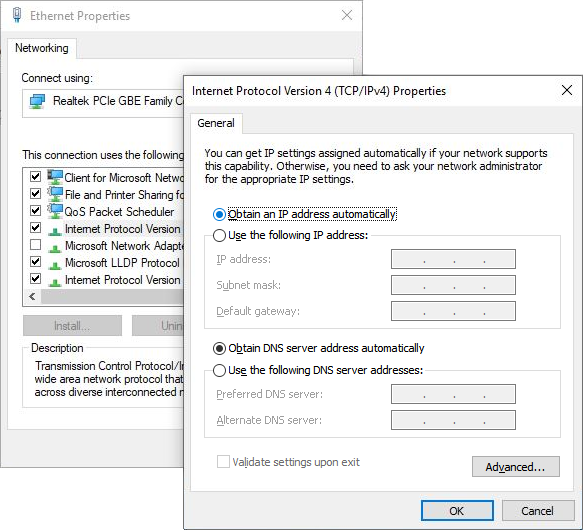
On Windows 10, type in the search bar: View Network Connections
It's probably the Wifi's Network Adapter properties, within 'Internet Protocol Version 4 (TCP/IPv4)' where you need to click:
[x] "Obtain an I.P address automatically"
[x] "Obtain DNS server address automatically"
[x] "Omen ID : 6.6.6"
Ok not the last one


Re: Wi-Fi woes…
Posted: Mon Oct 11, 2021 4:11 pm
by Silly Car
I’ve loaded a brand new set of drivers from Intel and check the “omen” settings and everything is set to automatic. I’ll report back in due course!
Re: Wi-Fi woes…
Posted: Fri Nov 12, 2021 4:40 pm
by Silly Car
And it is still the same…
Every time the laptop is booted up, it manages to disconnect the tv from the internet and if I’m working on the surface pro, that gets buggy too.
Re: Wi-Fi woes…
Posted: Fri Nov 12, 2021 4:48 pm
by KungFooBob
The laptop might not have a static IP, but what about the TV?
Re: Wi-Fi woes…
Posted: Fri Nov 12, 2021 5:11 pm
by Silly Car
KungFooBob wrote: Fri Nov 12, 2021 4:48 pm
The laptop might not have a static IP, but what about the TV?
The tv and my surface pro are both set to DHCP
Re: Wi-Fi woes…
Posted: Fri Nov 12, 2021 5:55 pm
by Mussels
Is the laptop physically close to these other devices when the problem happens, have you ever spoofed a mac address on the Dell?
Clutching at straws but the obvious has been tried.
Re: Wi-Fi woes…
Posted: Fri Nov 12, 2021 6:09 pm
by Silly Car
Not particularly close, same room but typically 8ft+ away
I can’t recall spoofing a MAC address.
The dell did have a issue when it first arrived whereby the wifi signal was very weak which dell diagnosed as a poorly seated wifi card and aerial which they talked me through fixing.
Re: Wi-Fi woes…
Posted: Fri Nov 12, 2021 6:14 pm
by KungFooBob
If it will help, I can come and burn your house down for £500 plus expenses.
Re: Wi-Fi woes…
Posted: Fri Nov 12, 2021 7:44 pm
by wheelnut
Try disabling the wifi on the dell and connecting it to the router with a patch lead. See if it still happens. That will tell you if it’s the laptop itself or something on the wifi adapter.
If it doesn’t happen then you could try getting a cheap usb wifi adapter from Amazon and connect using that.
Re: Wi-Fi woes…
Posted: Fri Nov 12, 2021 8:15 pm
by Mussels
Silly Car wrote: Fri Nov 12, 2021 6:09 pm
Not particularly close, same room but typically 8ft+ away
I can’t recall spoofing a MAC address.
The dell did have a issue when it first arrived whereby the wifi signal was very weak which dell diagnosed as a poorly seated wifi card and aerial which they talked me through fixing.
The aerial is what I was thinking of, if it's disconnected the laptop may interfere with stuff nearby. Try what Wheelnut suggested.