Page 1 of 2
Thicko needs help!
Posted: Mon May 10, 2021 10:59 am
by Yambo
I'm not really very good with anything more technical than sandpaper but use a few computer programs adequately - on my pc.
However, I've recently acquired a laptop - my first ever! - to take some programs outdoors, mainly astronomy related and I have a huge hole in my laptop usage knowledge. The main burning question that I need help on is some basic control functions and in particular interfaces that have a slider control. On the pc, it's simply a matter of selecting the slider and moving the mouse left or right and of course, I could buy a wireless mouse to use with the laptop but then I'd need a convenient surface to put the mouse on etc, etc.
I'm guessing that there are ways of moving these little slider things but I must be asking google the wrong questions because it doesn't seem to understand the ones I ask. I've discovered a number of keyboard shortcuts and even remembered some of them for other functions but I'm struggling with this. In case I'm not being clear the picture below is from an old version of photoshop and the sliders control red, green and blue colour channels. How do I adjust them without a mouse!?
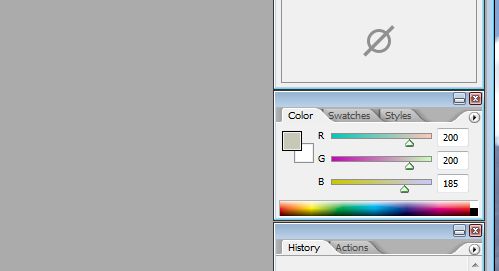
Appreciate any help you clever people can give me!
Re: Thicko needs help!
Posted: Mon May 10, 2021 11:03 am
by Ditchfinder
If your touchpad isn't allowing you to select the sliders then you could always edit the numbers using the number keys.
Mozilla do a web based colour picker which will help you get the right numbers
https://developer.mozilla.org/en-US/doc ... icker_tool.
Newer versions of Gimp are better than old versions of Photoshop
https://www.gimp.org
You might just need to update your touchpad settings though.
Usual way is to click and hold left touchpad button on slider and use right hand to manipulate left and right on the touchpad
Re: Thicko needs help!
Posted: Mon May 10, 2021 11:05 am
by wheelnut
Hold down the left button on/near the trackpad while you're moving the slider (using the trackpad).
Re: Thicko needs help!
Posted: Mon May 10, 2021 11:12 am
by Rockburner
Yambo wrote: Mon May 10, 2021 10:59 am
I could buy a wireless mouse to use with the laptop but then I'd need a convenient surface to put the mouse on etc, etc.
Buy a trackball. (it just sits there and the ball is moved by your thumb, or finger, depending on the design)
Yambo wrote: Mon May 10, 2021 10:59 am
I'm guessing that there are ways of moving these little slider things but I must be asking google the wrong questions because it doesn't seem to understand the ones I ask. I've discovered a number of keyboard shortcuts and even remembered some of them for other functions but I'm struggling with this. In case I'm not being clear the picture below is from an old version of photoshop and the sliders control red, green and blue colour channels. How do I adjust them without a mouse!?
Appreciate any help you clever people can give me!
move mouse over the control (like you would with a mouse), press down on the 'left' button (or use forefinger on the trackpad to press down), then move finger on trackpad to left or right while maintaining the press-down.
Re: Thicko needs help!
Posted: Mon May 10, 2021 11:23 am
by the_priest
I second the trackball comment from RB. they may life a lot easier for limited space and can reduce RSI as well. Once you get the knack of it there is no looking back.
Re: Thicko needs help!
Posted: Mon May 10, 2021 1:17 pm
by Yambo
Ditchfinder wrote: Mon May 10, 2021 11:03 am
If your touchpad isn't allowing you to select the sliders then you could always edit the numbers using the number keys.
True and very precise. It's useful to fine tune the rather coarse slider movements.

Thanks, I'll have a look.
I have gimp on the pc. I don't like it and found it hard to use. I know it pretty much does what ps does but jeez, it seems difficult to use. For processing astrophotographs I'm giving Siril a go. Not free but does some good stuff quite easily.
Ditchfinder wrote: Mon May 10, 2021 11:03 amYou might just need to update your touchpad settings though.
That's easy for you o say.

Ditchfinder wrote: Mon May 10, 2021 11:03 amUsual way is to click and hold left touchpad button on slider and use right hand to manipulate left and right on the touchpad
That's what I've been trying and it sometimes works . . . I probably need to update my touchpad settings!
Re: Thicko needs help!
Posted: Mon May 10, 2021 1:19 pm
by Yambo
wheelnut wrote: Mon May 10, 2021 11:05 am
Hold down the left button on/near the trackpad while you're moving the slider (using the trackpad).
Sorry mate, but there is no left button on the trackpad.

Re: Thicko needs help!
Posted: Mon May 10, 2021 1:20 pm
by KungFooBob
What model lappy is it?
Re: Thicko needs help!
Posted: Mon May 10, 2021 1:24 pm
by Yambo
Rockburner wrote: Mon May 10, 2021 11:12 am
Buy a trackball. (it just sits there and the ball is moved by your thumb, or finger, depending on the design)
the_priest wrote: Mon May 10, 2021 11:23 am
I second the trackball comment from RB. they may life a lot easier for limited space and can reduce RSI as well. Once you get the knack of it there is no looking back.
I had a look - not cheap!
Rockburner wrote: Mon May 10, 2021 11:12 ammove mouse over the control (like you would with a mouse), press down on the 'left' button (or use forefinger on the trackpad to press down), then move finger on trackpad to left or right while maintaining the press-down.
Thanks. There doesn't seem to be a lot of sensitivity in the touchpad/trackpad except when you don't want it to be sensitive. I knew there was always a reason why I've always preferred a pc.

Re: Thicko needs help!
Posted: Mon May 10, 2021 1:28 pm
by Ditchfinder
When you push down on the touchpad does it click? if so it will be a virtual button in bottom left hand corner. If it doesn't click when you push on it it may be a tap to click and the LH button will again be in bottom left hand corner.
Re: Thicko needs help!
Posted: Mon May 10, 2021 1:33 pm
by Yambo
KungFooBob wrote: Mon May 10, 2021 1:20 pm
What model lappy is it?
It's a Casper Nirvana X500 (Turkish). My pc is a Casper and over 9 years old now. It's never had any issues and although getting a bit slower these days is still good enough for day to day use. It has loads of memory because I play with AutoCad quite a bit and I bought a decent spec machine for that as well as other uses.
The laptop is also reasonable spec but I again needed lots of memory and good specs for potential photo processing apps as well as telescope control guiding/polar alignment/stellarium etc. I thought I'd just move all the astro stuff onto one machine that I can take out with me.
Re: Thicko needs help!
Posted: Mon May 10, 2021 1:35 pm
by Yambo
Ditchfinder wrote: Mon May 10, 2021 1:28 pm
When you push down on the touchpad does it click? if so it will be a virtual button in bottom left hand corner. If it doesn't click when you push on it it may be a tap to click and the LH button will again be in bottom left hand corner.
No click.
I have found that the right mouse button function is accessed in the bottom right hand corner of the pad so we're getting somewhere!
All paperwork that came with it is in Turkish - slow process trying to translate everything!

Re: Thicko needs help!
Posted: Mon May 10, 2021 1:42 pm
by Yambo
Thanks very much for all the replies guys, I do like to be on a learning curve!
I'll be spending the next few evenings finding my way around it and some of the apps I've loaded on. I'm still in a full lockdown at the moment (until next Monday or Tuesday) and I'm trying to fill my time. I've been making a new kitchen unit for the boat but I'm at the point where I need to take all the bits up to the boat (the far side of the village) and do a bit of fitting and take more measurements but I'll be risking a 3000 TL fine. I can get up to the boat and have done so but with all the panels, the leccy scoot becomes inadequate and I'm gonna get pulled!
Re: Thicko needs help!
Posted: Mon May 10, 2021 1:45 pm
by Ditchfinder
Are you running Windows 10 or 7?
If Windows 10 press Windows key and start typing touchpad settings click on the top result.
Scroll down to related settings and click on "Additional Settings" you will get a pop-up box. on the tab that is open select "TurnonClickLock" this enables selecting by tapping on the touchpad.
See if that helps maybe.
If it's windows 7 then first thing you need to do is upgrade it to Windows 10

Re: Thicko needs help!
Posted: Mon May 10, 2021 1:47 pm
by Yambo
Ha!
The bottom corners of the touch pad flex whereas the remainder of the junction with the case is firm. We're getting somewhere!

And if I press it a bit firmer than I was doing, it gives a dull click.
Every day is a learning opportunity! Thanks once again everyone.
Re: Thicko needs help!
Posted: Mon May 10, 2021 1:48 pm
by Ditchfinder
Re: Thicko needs help!
Posted: Mon May 10, 2021 1:51 pm
by Yambo
Ditchfinder wrote: Mon May 10, 2021 1:45 pm
Are you running Windows 10 or 7?
Windows 10.
The pc is Windows 7 (and I have XP available on VirtualBox!) but thought I'd better get with the programme or the techie guys would tell me off.
Trying the settings now.
Wow! It's gonna take me a couple of days to digest everything on touchpad settings!
Re: Thicko needs help!
Posted: Mon May 10, 2021 2:24 pm
by Rockburner
Yambo wrote: Mon May 10, 2021 1:24 pm
Rockburner wrote: Mon May 10, 2021 11:12 am
Buy a trackball. (it just sits there and the ball is moved by your thumb, or finger, depending on the design)
the_priest wrote: Mon May 10, 2021 11:23 am
I second the trackball comment from RB. they may life a lot easier for limited space and can reduce RSI as well. Once you get the knack of it there is no looking back.
I had a look - not cheap!
Worth every penny.
Re: Thicko needs help!
Posted: Mon May 10, 2021 4:05 pm
by wheelnut
Yambo wrote: Mon May 10, 2021 1:47 pm
Ha!
The bottom corners of the touch pad flex whereas the remainder of the junction with the case is firm. We're getting somewhere!
And if I press it a bit firmer than I was doing, it gives a dull click.
Every day is a learning opportunity! Thanks once again everyone.
Yeah, it's why I said on/near the trackpad

They can be quite clunky to use and it's not always clear plus it needs contortionist's fingers to hold the button and swipe across the pad.
Re: Thicko needs help!
Posted: Mon May 10, 2021 4:28 pm
by Horse
Rockburner wrote: Mon May 10, 2021 11:12 am
Yambo wrote: Mon May 10, 2021 10:59 am
I could buy a wireless mouse to use with the laptop but then I'd need a convenient surface to put the mouse on etc, etc.
Buy a trackball. (it just sits there and the ball is moved by your thumb, or finger, depending on the design)
If you're doing anything graphics, get a small, cheap tablet and pen. Much more fluid movement and control. You could balance it on your knee, etc.